your agents. one station.
A home for your AI agents. Build teams, give each agent a job, a model and the tools it needs, and watch them work together on a live map.
No account and no login: it runs on your computer. Works with Claude Code, Codex, opencode, local models and MCP. Free and open source.
every agent. on one live map.
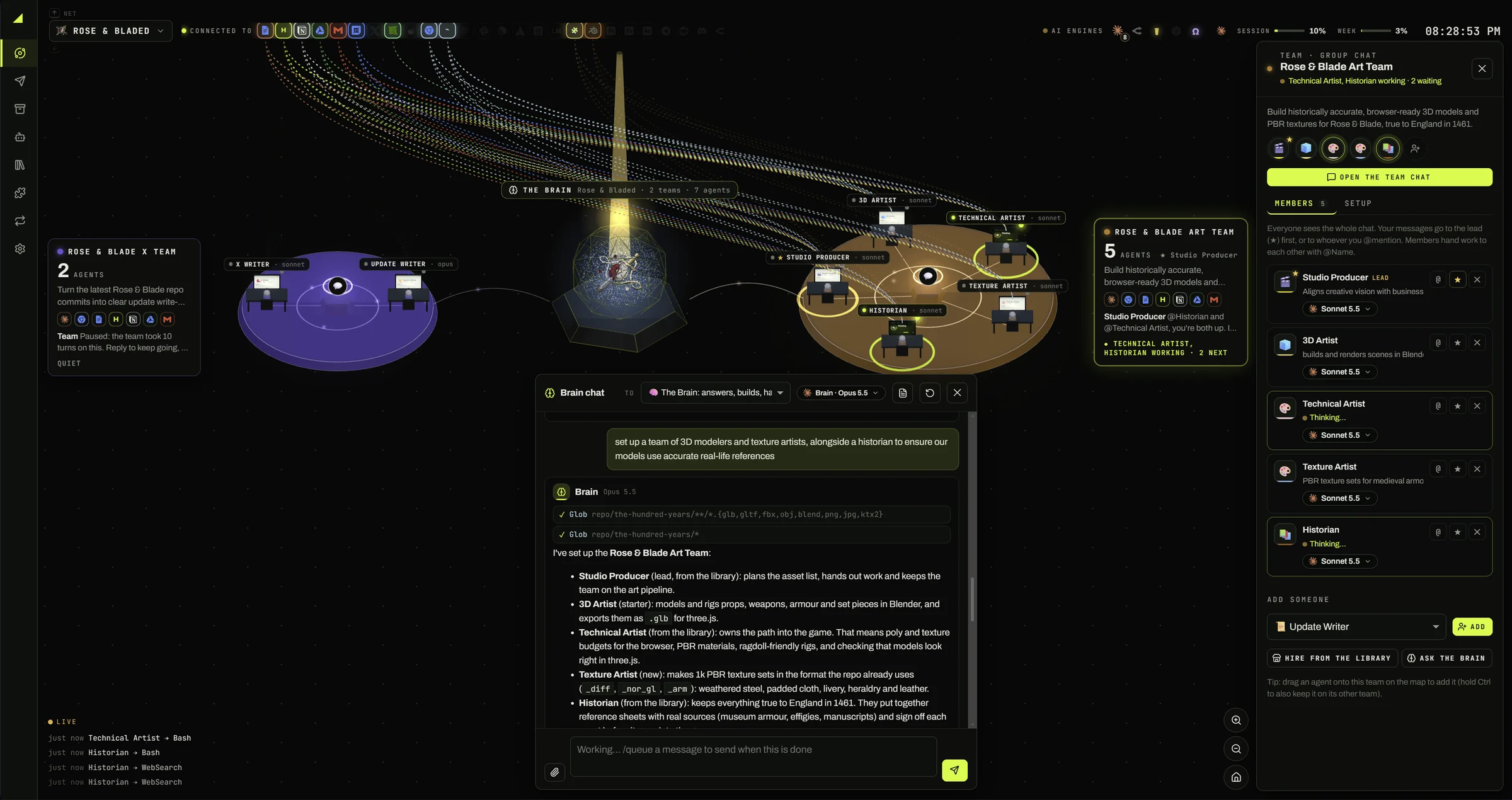
The Station is your project as a live 3D map. You see who is working, who is waiting on you, and which tools they are using, without opening a single tab.
Teams are pods
Each team is a pod with its agents at their desks. Click a team to open its panel and chat.
The Brain sits in the middle
It runs the project for you: it sets up teams, hands out the work and checks it got done.
Lines light up when work happens
Programs and services run along the top. A line lights up each time an agent calls one, and the feed at the bottom left shows what's happening now.
Pick a look
Turn on Voxel world and your agents build a little world around the teams, or Scene: a web page your agents draw for the project, live.
describe the job. get a team.
The Brain is the assistant that runs the project for you. Tell it what you want done: it sets up the agents, writes their instructions, picks their tools and hands out the work.
Set up a team of 3D modelers and texture artists, alongside a historian to make sure our models use accurate real-life references.
I've set up the Art Team:
- ▪Studio Producer (lead: plans the asset list and hands out the work)
- ▪3D Artist (from the library: models props and set pieces in Blender, exports .glb)
- ▪Technical Artist (from the library: owns poly and texture budgets, checks models in the game)
- ▪Texture Artist (new: makes PBR texture sets in the repo's format)
- ▪Historian (new: keeps everything true to England in 1461)
Describe the job
Press Space on the map, or Ctrl+K / ⌘K anywhere, and say what you want done in plain words.
Check the team it builds
Look over each agent's model, instructions and tools before anything starts. Change what you like.
It follows up
When you ask for real work, the Brain checks it got done and follows up. Anything that needs you lands in Needs you.
Ask it where things stand
Ask what still needs you before Friday, and it answers from the whole project: drafts in the Outbox, open questions, work in review.
89 specialists. ready to hire.
Need someone the team doesn't have? Hire a specialist from the Agent library with its instructions already written. Its role is where it's strongest, not a limit: it takes on nearby work too.
Audits websites, apps and documents against WCAG, Section 508 and the European Accessibility Act, puts what stops disabled people finishing a task first, and can fix it or draft the conformance report.
Checks an app built mostly with AI tools, often on Supabase, Firebase or Vercel, for leaked keys, open databases and unguarded endpoints, explains each risk in plain words and fixes the worst first.
Builds AI into products, from model API calls and answers over your own documents (RAG) to tools, agents and classic ML, measured with real evals and kept safe and affordable to run.
Tests REST, GraphQL and webhook APIs, yours or ones you depend on, against their docs under bad input, wrong users, retries and failures, then writes the tests that keep them working.
Secures an app from the inside, before a launch or after a scan: threat models, security code review, dependency risk, CI scanners, and the fix with a test that keeps it fixed.
Designs and builds the server side, from APIs and data models to migrations, background jobs and permissions, so it holds up under load and failure and can change without breaking its clients.
Reviews a change, AI-written or not, for bugs, security holes and code that will be hard to keep, says what to fix first and can fix it.
Explains an unfamiliar codebase to its owner, a new developer or an agent about to change it: how it fits together, which files a change needs, and where it has drifted.
Builds and fixes data pipelines: gets data from apps, files and APIs into a database or warehouse, shapes it into tested tables that reports can trust, and keeps it loading on schedule.
Showing 9 of 89. The same 89 come with the app.
89 agents, written for Athena
Engineers, designers, marketers, researchers, a bookkeeper, a World Builder for the voxel world and more, each with the tools and skills its work needs.
A starter team in one click
Add Athena team on Home hires a Coordinator, an X Writer, an Image Maker, a Researcher and the rest of the starters at once.
Or bring your own
Use your Hermes profiles, your Claude Code subagents and the agents and teams you saved as presets.
// The agents are Athena's own, written for it and its tools, and come with the app, so the Library works with no download. Hiring one copies its instructions into a new agent you can change.
any model. mixed freely.
Each agent picks its own model and how hard it thinks. Put the writer on Fable and the 3D artist on Opus, give the routine work to DeepSeek or a local model, and they still work as one team.
A model for every agent
Claude Opus, Sonnet, Haiku or Fable, GPT through Codex, DeepSeek, Gemini and Llama through Eve, or a model on your own PC with Ollama or LM Studio.
Set how hard it thinks
Effort goes from Minimal to Max, per agent. Each engine has its own range, and Athena sends the nearest level it takes.
Choose by price or by the job
API models show their price per million tokens right in the picker. Give the hard parts to a big model and the routine work to a cheaper or local one.
Still one team
Handoffs, @mentions and the team chat work the same whatever each agent runs on, so every agent does the part it is best at.
Engines you can use
Claude Code
The claude CLI, signed in with your Claude account, an Anthropic key or OpenRouter.
OpenAI Codex
The codex CLI and your ChatGPT login. Settings can install it and sign you in.
Eve
Built in. Any model from an OpenRouter or Venice key, a local Ollama or LM Studio server, or any OpenAI-compatible address.
opencode
opencode 2 or later. Its free models work right away; sign in to your own providers with opencode auth login.
Hermes
Hermes installed, with a profile to use.
pi / oh-my-pi
The pi or omp CLI, signed in to a model provider.
OpenClaw
The openclaw CLI, set up with openclaw onboard.
The Brain's model
The Brain can think with Claude Code, Eve, Hermes, Codex or opencode. Pick it on the same page.
// Set up only the engines you want, under Settings → General & keys: you need just one. Star the models you use most so they are one click away.
agents that pass the work on.
A team works in one group chat. You watch the work move from agent to agent, and step in whenever you want.
Everyone sees the whole chat
Your message goes to the lead, or to whoever you @mention. Write #Team name to ask another team.
Agents pass the work on
They hand work to each other with @mentions and post what they make right in the chat: images, video, audio, and 3D models you can turn with the mouse.
Change course any time
Write while they work: most agents read your message between steps and carry on with it, without starting over.
Commands when you need them
Type / for them: /queue lines up the next message, /loop repeats one, /goal says what done looks like, and /learn makes a skill.
Floating windows
Chats open in windows you can tab, snap side by side and minimize. Earlier chats are a click away to pick up again.
the work. and what came of it.
A board for what the project has to do, and one place for everything the teams finished.
Tasks
To do, In progress, In review, Blocked and Done. Give a task to an agent, a team or the Brain and move it to In progress: they pick it up, comment with what they made, and move it on. The Brain can add, move, assign and tag tasks for you.
Artifacts
Written results, files and folders, each with a preview, who made it, for which team, and when.
// Overview shows every project's agents, teams, Brain and tasks at work on one page, with what needs you first. Open their chats side by side and write to another project's agents without switching to it.
nothing goes out without you.
You decide how much each agent may do alone. Risky steps wait for your OK, agents ask you when they're stuck, and posts and messages sit in the Outbox until you approve them.
Needs you
Permission requests for risky steps wait here. Agents ask you here when they're stuck.
Outbox
Questions come with the choices as buttons. Drafts for X, Reddit, Telegram, Slack and Discord wait for you to approve, edit, talk over or reject. X replies always wait.
The Brain lets routine work through
It approves routine, reversible requests for you and sends anything risky or unclear to Needs you.
it learns how you work. reach it from anywhere.
Agents keep notes on what you like and what you decided, and turn what you show them into skills. Then talk to them from your phone, or let other services start the work.
Memory
Every agent and the Brain keep a MEMORY.md for each project with how you like things done and what you decided, read with every message. You can read and change it.
/learn
Turns a document, a link, a video or a screen recording of you doing a task into a skill any agent can use.
Skills
Instructions in plain words, like our brand voice or how we test checkout, shared across agents and teams. Many come with the app; write your own or install one from GitHub.
Chat gateways
Talk to the Brain, a team or an agent from Telegram, Slack or Discord, files included. Each bot answers only the people and channels you let in.
Routines
Work you want done again and again, run by hand, on a schedule, or by a webhook from GitHub, Stripe, Linear, Slack and others.
Webhooks, safely
They have a port of their own that answers nothing else, and the Cloudflare or Tailscale tunnel Athena starts in one click only ever points there.
your programs. their hands.
Connect agents to programs and services with the Model Context Protocol. Athena finds what you have installed, suggests the server that fits, and adds it in one click.
Agents can also pull free textures, HDRIs and models from Poly Haven and ambientCG.
Suggested for this PC
The Programs page finds the creative and CAD apps you have, and Athena points out the MCP servers that fit them.
One click, or ask the Brain
Add servers from a list of ready-made ones, or just ask. Agents run your ComfyUI workflows and get the images, video, audio and 3D files back.
The Brain uses them too
“Check my Gmail through Composio.” Settings → The Brain's tools sets whether it runs them all, asks before ones that change things, or doesn't use them.
your computer. your work.
Athena's server and saved work stay on your machine. Local doesn't mean offline: hosted models and connected services receive what you send them. Use Ollama or LM Studio to keep the model on your machine too.
No account, no login
Athena runs on your computer. There is nothing to sign up for.
Only your computer can reach it
It listens on 127.0.0.1. No login means no lock, so never put it behind a public tunnel or proxy.
Keys stay on the server
API keys and account tokens are never sent to the browser or put into project saves and backups.
Saved with the project
Each project keeps a copy of its agents, teams, chats and results in its folder. Open the folder again and it all comes back.
Backups in one file
Back up a project to a single .dashbackup file and restore it as a new project.
History you can undo
Every agent, team, skill and memory keeps its last 50 versions, so any change can be undone.
free to use. yours to change.
Athena Agents is open source, licensed MIT or Apache-2.0. Install the desktop app like any other app, or run it from the source with Bun.
git clone https://github.com/ai-2070/athena-agents
cd athena-agents
bun install
bun run start